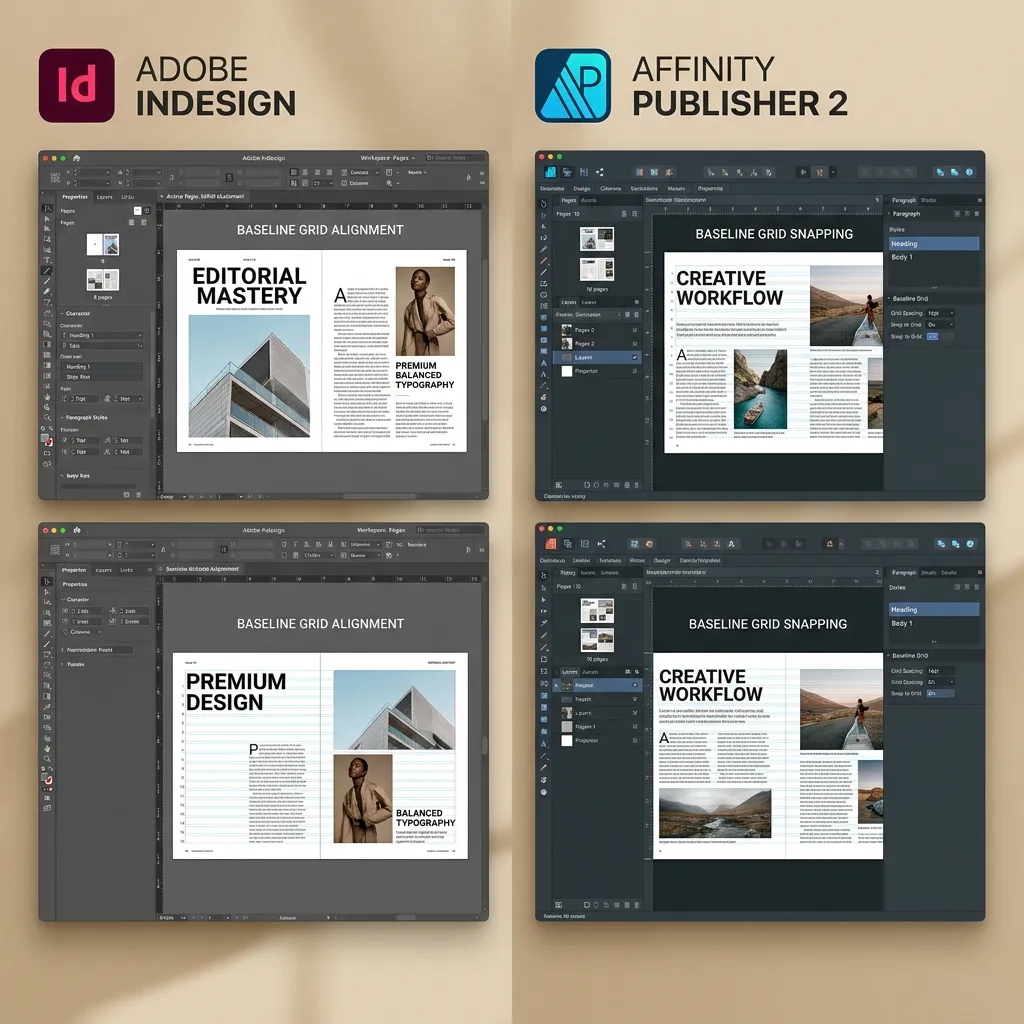
Comparing Adobe InDesign and Affinity Publisher for book design shows that InDesign is the industry-standard subscription software ideal for multi-book series and complex ePUB exports, while Affinity Publisher is a cost-effective one-time purchase best for simple standalone novels and graphic-heavy layouts.
Choosing the wrong desktop publishing application can limit your formatting control and affect your print file quality. Understanding the technical differences prevents layout issues during print-ready file creation.
In this guide, we compare document syncing, print file presets, eBook output support, and team review tools across both platforms. Before starting, read our standard book trim sizes guide to choose your target size, then calculate your exact spine width once your interior page layout is finalized. Ensure your final file complies with print-ready PDF requirements and compare Word versus InDesign formatting workflows to see how design quality affects your software choice.
Feature Comparison: Adobe InDesign vs. Affinity Publisher
Before diving into the detailed analysis, here is how the two layout applications compare side-by-side across major book-production categories:
Feature / Category | Adobe InDesign | Affinity Publisher 2 |
|---|---|---|
Long Book Documents | Strong (Books panel synchronizes separate files) | Good (Supports single documents; tends to lag on massive files) |
Print Production | Industry Standard (PDF/X-1a and PDF/X-3 native presets) | Capable (Outputs high-quality print PDFs with bleed controls) |
EPUB Workflow | Better (Sophisticated reflowable and fixed-layout exports) | Limited (Basic eBook export; lacks deep ePub3 layout controls) |
Collaboration | Stronger (Share for Review, Creative Cloud libraries) | Weaker (Mainly desktop-focused; lacks robust review platforms) |
Professional Acceptance | Higher (Universally expected by printing presses and houses) | Lower (Highly popular for DIY, but not standard in print shops) |
Cost Model | Subscription-based (~$22.99/month) | One-time purchase (~$70 for lifetime version) |
For complex layouts, InDesign remains the choice of professional typesetting houses, while Affinity is an excellent choice for independent authors formatting their own books.
Pro Insight
- If you plan to collaborate with professional formatters, check which software they use, as files cannot be converted between platforms.
- Try the free trial version of both programs to see which interface fits your design workflow better.
When Affinity Publisher is Fine
Affinity Publisher is a highly competent desktop publishing application. It is more than adequate for:
- Independent Authors on a Budget: If you want a professional layout but want to avoid monthly Adobe subscription fees.
- Standard Novels and Memoirs: Text-only books that do not require complex databases, indexing, or massive footnotes.
- Graphic Designers and Illustrators: Affinity's StudioLink technology allows you to edit vector graphics (Affinity Designer) and raster images (Affinity Photo) within the layout application without switching windows.
- Single-Volume Projects: Books under 300 pages that can be designed in a single workspace file.
Pro Insight
- Take advantage of Affinity's master pages and style sheets to ensure formatting is consistent across chapters.
- Export using the highest quality PDF print settings to keep images sharp.
When Adobe InDesign is Better
Adobe InDesign remains the industry standard for a reason. It is the necessary choice for:
- Multi-Volume Series: The InDesign Books panel allows you to link multiple documents (such as separate chapters or volumes) and synchronize character/paragraph styles globally.
- Complex Academic Non-Fiction: If your book requires detailed indexing, multi-column layouts, or automated footnotes and endnotes.
- Advanced Micro-Typography: InDesign features GREP styles, allowing you to use pattern-matching code to automatically format specific text strings (like preventing widows, formatting acronyms, or styling page numbers).
- EPUB3 and Reflowable eBook Export: InDesign's eBook export engine is highly advanced, generating clean XHTML that is compatible with all major e-readers.
Pro Insight
- Use InDesign's Book panel to organize large manuscripts into smaller, manageable chapter files.
- Leverage GREP styles to automatically apply character formatting to variables like dates and pricing.
Why DesignDile Uses InDesign
At DesignDile, we use Adobe InDesign exclusively for our print and eBook formatting work because it guarantees that our files will meet the technical requirements of KDP and IngramSpark. Furthermore, InDesign allows us to export industry-standard IDML files. This ensures our clients are never locked into our services—they can open and edit their source files with any professional designer in the future.
InDesign's preflight tools also allow us to verify image resolution, color-space conversion, and font embedding before we send the final files to our clients.
Pro Insight
- Check that your formatter provides raw editable InDesign source files (.indd or .idml) upon completion.
- Make sure your files have passed preflight verification to prevent print-on-demand rejection.
Best Software for KDP and IngramSpark Files
Both KDP and IngramSpark require print-ready PDF files. InDesign is the gold standard for producing these because of its native PDF/X-1a:2001 preset, which flattens transparency layers and embeds all fonts. While Affinity Publisher can export PDFs, printing press software occasionally flags Affinity-generated PDFs due to color profile discrepancies or complex transparency handling. For high-volume print runs, InDesign's outputs are the most reliable.
Pro Insight
- Always check the PDF preflight report on KDP and IngramSpark to ensure no font embedding errors occurred.
- Avoid using web-standard PDFs for print uploads; they lack the color-space and font embedding security required.
The Takeaway
Whether you choose Affinity Publisher for DIY formatting or Adobe InDesign for professional print production, having standard files is what matters. DesignDile uses Adobe InDesign exclusively for our interior formatting services and InDesign design service. Compare our packages and reach out through our contact page to start today.
Frequently Asked Questions
Sources & Technical References
Related reading

KDP Formatting
How to Choose the Perfect Book Trim Size: 2026 KDP & IngramSpark Guide
12 min read
Typography & Layout
The Best Fonts for Printed Books: 2026 Guide to Serif vs Sans Serif Typography
11 min read

Typography & Layout
Book Formatting Costs 2026: DIY vs Professional Typesetter – Which Saves You More?
10 min read
Explore our book design services, read KDP formatting guide, see our portfolio, or view transparent pricing.